
Comment supprimer Mantax Otax des appareils Android
de TroieÉgalement connu sous le nom de: Mantax Otax trojan

Obtenez une analyse gratuite et vérifiez si votre ordinateur est infecté.
SUPPRIMEZ-LES MAINTENANTPour utiliser le produit complet, vous devez acheter une licence pour Combo Cleaner. 7 jours d’essai limité gratuit disponible. Combo Cleaner est détenu et exploité par RCS LT, la société mère de PCRisk.
Quel type de malware est Mantax Otax ?
Mantax Otax est un ransomware Android doté de fonctionnalités spyware intégrées, ciblant les utilisateurs en Indonésie. Il chiffre les fichiers présents sur l'appareil, verrouille l'écran et pousse les victimes à engager une conversation avec les attaquants, tout en dérobant discrètement messages, photos, mots de passe et autres données personnelles. Le malware a été analysé pour la première fois par l'équipe zLabs de Zimperium.

Aperçu du malware Mantax Otax
Mantax Otax est lié à des acteurs malveillants indonésiens, et deux versions ont été découvertes jusqu'à présent, la seconde s'appuyant sur la première. Des indices linguistiques et des fichiers récupérés auprès des victimes montrent que les opérateurs ciblent les utilisateurs indonésiens.
Juste après l'installation, le malware demande les droits d'administrateur de l'appareil. L'invite d'administration énumère ouvertement des capacités telles que l'effacement de toutes les données, la modification du verrouillage de l'écran, le verrouillage de l'écran et la désactivation des caméras. Il demande ensuite l'accès à la caméra, aux messages SMS, aux contacts, à l'audio et aux images, ainsi que l'autorisation d'afficher du contenu par-dessus d'autres applications.
La dernière étape est une demande d'accès aux services d'accessibilité, présentée sous la forme d'une fenêtre contextuelle en langue indonésienne qui demande à la victime d'activer à la fois l'accessibilité et l'accès aux notifications. Une fois accordé, cela donne aux attaquants un large contrôle sur l'appareil, y compris la capacité de lire ce qui est affiché à l'écran et d'effectuer des saisies à la place de la victime.
Mantax Otax communique avec son serveur de commande et de contrôle (C2) via HTTPS. Au lieu de stocker l'adresse du serveur dans son code, il récupère le domaine actuel (apimantax[.]otax[.]fun) depuis un dépôt GitHub. Cela permet aux opérateurs de passer à un nouveau serveur chaque fois que l'ancien est bloqué, sans avoir à mettre à jour le malware lui-même.
Le malware attribue ensuite à l'appareil un identifiant unique et l'enregistre auprès du serveur. Les données d'enregistrement incluent le modèle et le fabricant du téléphone, la version d'Android, le pays, l'opérateur mobile, et même le fait qu'un code PIN de verrouillage d'écran ait été défini ou non. Après cela, il attend des commandes, qui sont transmises via Firebase.
Pour la partie ransomware, Mantax Otax demande une clé de chiffrement au serveur C2. Chaque clé est liée à l'identifiant Android de la victime, de sorte que chaque appareil infecté en reçoit une différente. Le malware recherche ensuite les photos, vidéos, documents, archives, bases de données et fichiers de clés cryptographiques, les verrouille avec un chiffrement AES et supprime les originaux.
Les fichiers chiffrés conservent leur nom d'origine avec .enc ajouté à la fin (par exemple, sample_image.jpg.enc). Certaines images sont également remplacées par des copies modifiées portant le message « Your files have been encrypted. Pay to decrypt. » Lors du test de Zimperium, les miniatures de la galerie se sont transformées en icônes de fichiers vides, une image étant remplacée par un texte de rançon rouge.
L'ampleur des dégâts dépend de la version d'Android. Sur Android 9 ou une version antérieure, le malware fouille l'ensemble du stockage partagé, en ignorant uniquement les dossiers système qu'il doit laisser intacts pour éviter de faire planter le téléphone. Android 10 et versions ultérieures utilisent une protection appelée Scoped Storage, qui confine le malware à son propre dossier d'application et limite considérablement le nombre de fichiers auxquels il peut accéder.
Une fois le chiffrement terminé, une fenêtre de discussion en plein écran intitulée SYSTEM PROTECTED prend le contrôle de l'affichage, et l'attaquant y apparaît sous le nom Mantax Bro!!. C'est là que les victimes sont invitées à négocier un paiement. Parce que les opérateurs ont mal configuré leur serveur Firebase, Zimperium a pu lire ces conversations, y compris des messages de victimes suppliant de récupérer leurs fichiers.
Combiné au vol de données décrit ci-dessous, cela place les victimes dans une situation de double extorsion, où à la fois leurs fichiers et leurs informations personnelles se retrouvent entre les mains des attaquants.
Mantax Otax peut également verrouiller le téléphone derrière un faux écran de verrouillage système. Une version affiche SYSTEM PROTECTED, prétend que l'appareil est sous verrouillage administratif et porte la marque Manta X2 Elite Security, tandis qu'une autre est rédigée en indonésien. Les deux demandent un code PIN, de sorte que les victimes finissent par remettre directement leur véritable code de verrouillage d'écran aux attaquants.
Le volet espion est tout aussi étendu. En abusant de la fonction intégrée d'enregistrement d'écran d'Android (l'API MediaProjection), le malware peut faire des captures d'écran, enregistrer l'écran sous forme de vidéos MP4 et diffuser l'affichage en direct aux attaquants. Les captures d'écran et les enregistrements sont téléversés vers l'hébergeur de fichiers gratuit Catbox, et les liens de téléchargement sont envoyés aux opérateurs.
En plus de cela, Mantax Otax collecte les contacts, les journaux d'appels, les messages SMS entrants (y compris les mots de passe à usage unique utilisés pour les connexions), les notifications, l'historique de navigation, les applications installées, la localisation, les comptes Google liés, les fichiers et les photos de la galerie. Via les services d'accessibilité, il vole également les profils et messages WhatsApp, ainsi que les détails de compte et les conversations Telegram, en ouvrant lui-même les conversations et en copiant leur contenu.
Le malware peut prendre secrètement des photos avec la caméra avant ou arrière, sans aucun signe visible à l'écran. Les photos sont compressées, encodées en Base64 et envoyées aux opérateurs - des enregistrements de serveur divulgués montrent qu'elles sont également stockées sur Catbox.
Les fichiers exposés par le serveur mal configuré comprenaient également une capture d'écran du panneau de contrôle des opérateurs, portant la marque Manta Controller. À ce moment-là, il répertoriait 210 appareils infectés (dont deux seulement en ligne), y compris des téléphones de vivo, Infinix et Xiaomi.
La deuxième version passe à des connexions WebSocket via un autre sous-domaine (apixnxx[.]otax[.]fun) et ajoute de nouvelles commandes visant à contrôler et à tourmenter les victimes. Elle peut verrouiller l'écran avec un message en langue indonésienne affirmant que l'appareil est contrôlé par Manta X2, que toute activité est surveillée et que la victime doit contacter un administrateur pour retrouver l'accès.
La version 2 peut également bloquer des applications individuelles et placer une couche invisible sur tout l'écran qui absorbe chaque saisie et chaque balayage, laissant le téléphone visible mais inutilisable. D'autres commandes inondent l'affichage de fenêtres contextuelles, lisent une vidéo en plein écran pour masquer ce qui se passe en arrière-plan, ou font clignoter des images effrayantes toutes les 600 millisecondes pour créer un effet stroboscopique désorientant.
Les opérateurs peuvent même faire parler le téléphone. Une commande de synthèse vocale à distance lit à voix haute tout message choisi par les attaquants via le haut-parleur de l'appareil, avec une langue, une vitesse et une hauteur ajustables.
En résumé, la présence de logiciels tels que Mantax Otax sur les appareils peut entraîner de multiples infections du système, de graves problèmes de confidentialité, des pertes financières et le vol d'identité. Les victimes risquent de perdre leurs photos et documents, leurs comptes et leurs conversations privées, le tout en même temps.
Il faut mentionner que les développeurs de malwares améliorent souvent leurs logiciels et leurs méthodes. Par conséquent, de potentielles futures itérations de Mantax Otax pourraient présenter des fonctionnalités et caractéristiques supplémentaires ou différentes.
| Nom | Mantax Otax trojan |
| Type De Menace | Malware Android, application malveillante, ransomware, spyware, application indésirable. |
| Noms De Détection | Avast-Mobile (Android:Evo-gen [Trj]), Combo Cleaner (Android.Riskware.SpyAgent.OV), ESET-NOD32 (Android/Spy.Agent.GGC Trojan), Kaspersky (HEUR:Backdoor.AndroidOS.Agent.iz), Liste Complète (VirusTotal) |
| Symptômes | Les fichiers sont chiffrés et renommés avec l'extension .enc, l'écran est verrouillé par un faux verrouillage système ou une fenêtre de discussion, l'appareil fonctionne lentement, l'utilisation des données et de la batterie augmente considérablement, des applications douteuses apparaissent, des fenêtres contextuelles et des superpositions bloquent l'utilisation normale. |
| Méthodes De Distribution | Fichiers APK sur des services de partage de fichiers tiers, liens partagés via des applications de messagerie, messages de phishing, ingénierie sociale, applications déguisées en applications légitimes ou pour adultes. |
| Dommages | Fichiers chiffrés, appareil verrouillé, informations personnelles volées (messages privés, identifiants/mots de passe, mots de passe à usage unique, photos, etc.), performances de l'appareil réduites, batterie vidée rapidement, vitesse Internet réduite, pertes massives de données, pertes financières, vol d'identité (les applications malveillantes peuvent abuser des applications de communication). |
|
Suppression des maliciels (Windows) |
Pour éliminer d'éventuelles infections par des maliciels, analysez votre ordinateur avec un logiciel antivirus légitime. Nos chercheurs en sécurité recommandent d'utiliser Combo Cleaner. Téléchargez Combo CleanerUn scanner gratuit vérifie si votre ordinateur est infecté. Pour utiliser le produit complet, vous devez acheter une licence pour Combo Cleaner. 7 jours d’essai limité gratuit disponible. Combo Cleaner est détenu et exploité par RCS LT, la société mère de PCRisk. |
Conclusion
Mantax Otax est une combinaison redoutable de ransomware et de spyware. Il peut priver une victime de l'accès à son téléphone et à ses fichiers, la pousser à payer via une fenêtre de discussion, et en même temps collecter presque tout ce qui est stocké sur l'appareil ou affiché par celui-ci. Même si les fichiers sont récupérés, les messages, codes et photos volés restent un risque à long terme.
Parmi d'autres exemples de malwares spécifiques à Android figurent Manic, WindRelay et Rokarolla. Les applications malveillantes de ce type ont tendance à demander des autorisations étendues et à en abuser pour voler des données, espionner les utilisateurs ou prendre complètement le contrôle de l'appareil.
Comment Mantax Otax s'est-il infiltré dans mon appareil ?
Zimperium a trouvé des échantillons de Mantax Otax hébergés sous forme de fichiers APK sur un service de partage de fichiers tiers, où l'un d'eux était proposé sous le nom VoCNewEra. Les liens vers de tels fichiers sont généralement diffusés via des applications de messagerie, des messages de phishing et d'autres astuces d'ingénierie sociale. Étant donné que l'application n'est pas sur le Google Play Store, les victimes doivent autoriser manuellement son installation.
Les leurres observés jusqu'à présent comprennent une application portant un nom indonésien évoquant du contenu pour adultes, et certains échantillons se feraient passer pour des applications légitimes telles que Grok. Les cybercriminels comptent sur de tels déguisements car les utilisateurs curieux ou confiants sont plus susceptibles de valider la longue liste de demandes d'autorisation sans réfléchir.
Comment éviter l'installation de malwares ?
N'installez des applications que depuis le Google Play Store ou le site officiel du développeur, et méfiez-vous des fichiers APK partagés via des liens d'hébergement de fichiers, des discussions ou des réseaux sociaux - même lorsqu'un ami vous les envoie. Faites attention aux autorisations qu'une application demande. Un lecteur vidéo, un chatbot ou un jeu n'a aucune raison d'avoir besoin de droits d'administrateur, des services d'accessibilité, ou de la capacité de lire vos messages SMS.
Maintenez Android et vos applications à jour, car les versions plus récentes d'Android limitent ce à quoi un malware comme celui-ci peut accéder. Ignorez les messages inattendus qui vous incitent à télécharger quelque chose, et évitez les applications pour adultes, piratées ou « premium gratuit » provenant de sources non officielles. Il est également utile d'avoir un antivirus mobile réputé installé et de sauvegarder régulièrement les photos et documents importants.
APK de Mantax Otax hébergé sur un site de partage de fichiers tiers (source : zimperium.com) :

Demandes d'autorisation affichées par Mantax Otax lors de l'installation (source : zimperium.com) :

Fichiers sur un appareil infecté avant et après le chiffrement par Mantax Otax (source : zimperium.com) :

Faux écrans de verrouillage utilisés par Mantax Otax pour voler le code PIN de la victime (source : zimperium.com) :

Message de blocage d'écran affiché par la deuxième version de Mantax Otax (source : zimperium.com) :

Menu rapide :
- Introduction
- Comment supprimer l'historique de navigation du navigateur Chrome ?
- Comment désactiver les notifications du navigateur dans le navigateur Chrome ?
- Comment réinitialiser le navigateur Chrome ?
- Comment supprimer l'historique de navigation du navigateur Firefox ?
- Comment désactiver les notifications du navigateur dans le navigateur Firefox ?
- Comment réinitialiser le navigateur Firefox ?
- Comment désinstaller des applications potentiellement indésirables et/ou malveillantes ?
- Comment démarrer l'appareil Android en « Mode sans échec » ?
- Comment vérifier l'utilisation de la batterie de diverses applications ?
- Comment vérifier l'utilisation des données de diverses applications ?
- Comment installer les dernières mises à jour logicielles ?
- Comment réinitialiser le système à son état par défaut ?
- Comment désactiver les applications disposant de privilèges d'administrateur ?
Supprimer l'historique de navigation du navigateur Chrome :
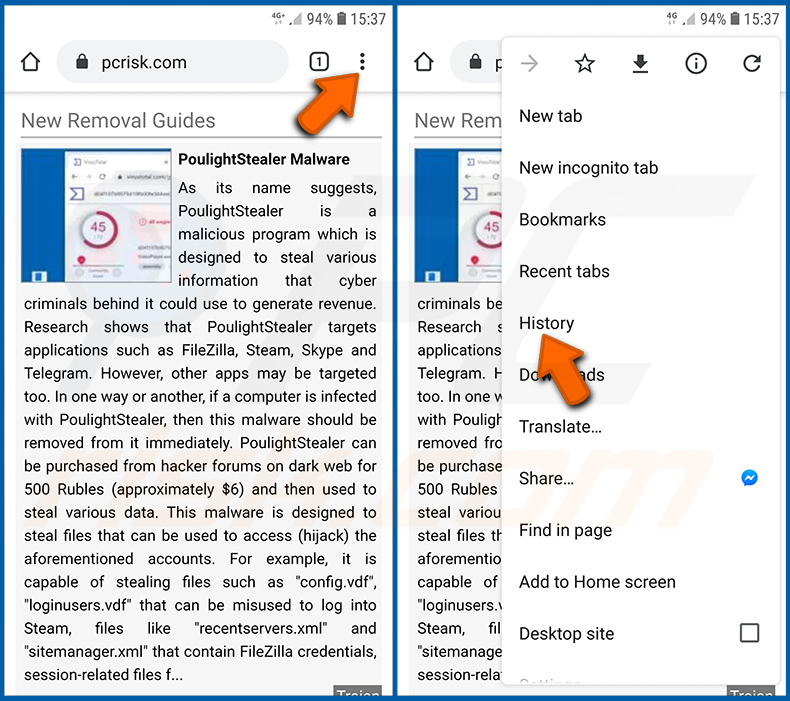
Appuyez sur le bouton « Menu » (trois points dans le coin supérieur droit de l'écran) et sélectionnez « Historique » dans le menu déroulant ouvert.
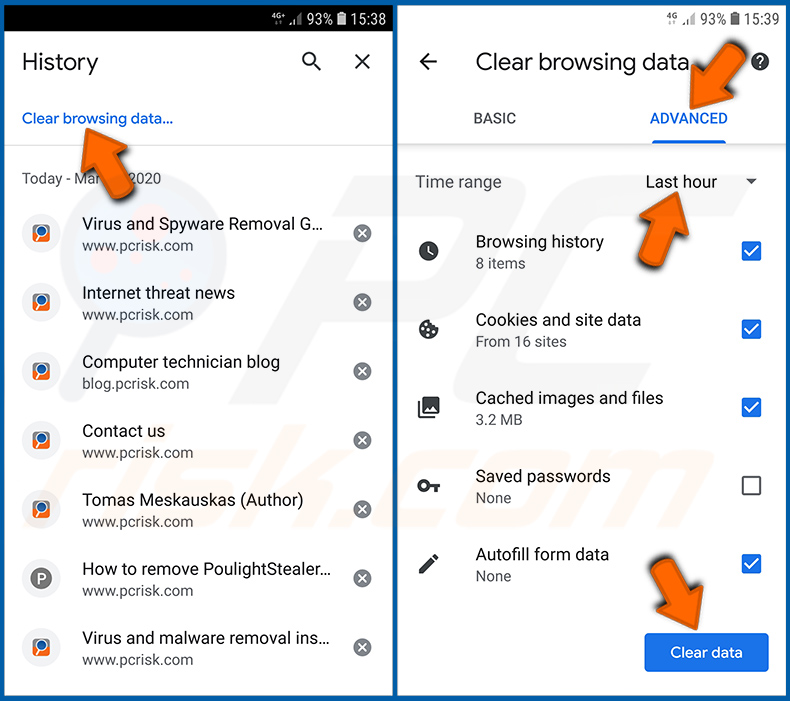
Appuyez sur « Effacer les données de navigation », sélectionnez l'onglet « AVANCÉ », choisissez la plage horaire et les types de données que vous souhaitez supprimer, puis appuyez sur « Effacer les données ».
[Retour à la Table des Matières]
Désactiver les notifications du navigateur dans le navigateur Chrome :
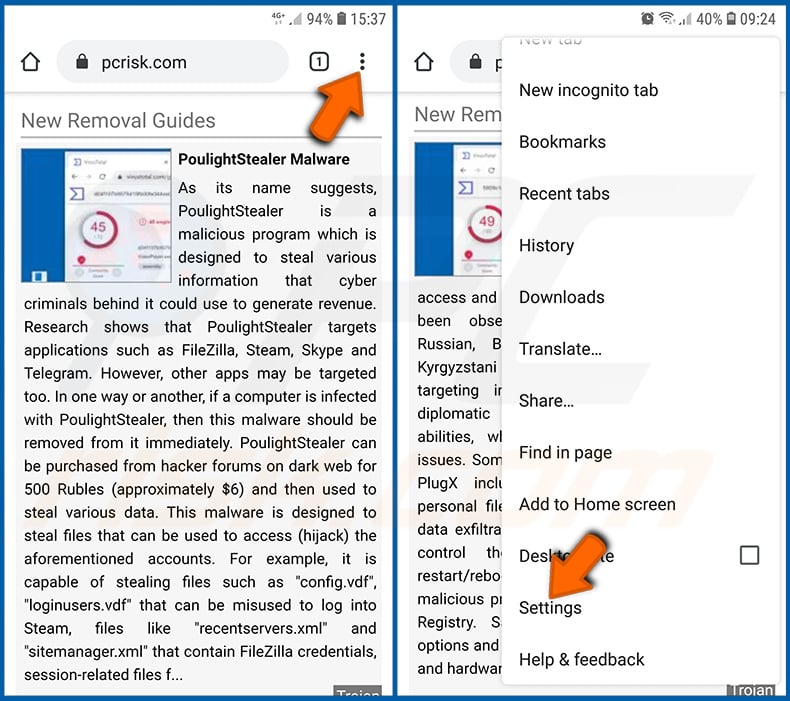
Appuyez sur le bouton « Menu » (trois points dans le coin supérieur droit de l'écran) et sélectionnez « Paramètres » dans le menu déroulant ouvert.
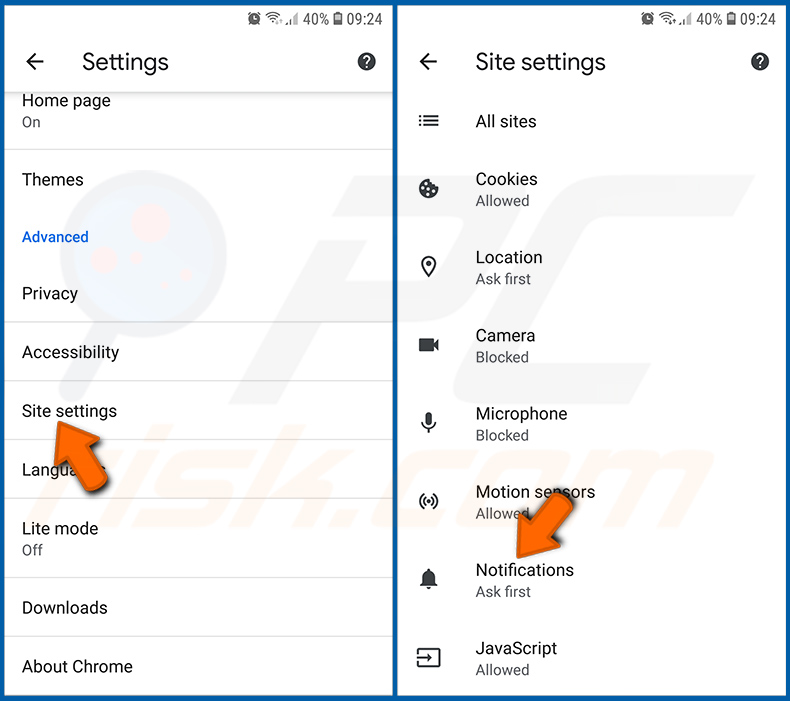
Faites défiler jusqu'à ce que vous voyiez l'option « Paramètres des sites » et appuyez dessus. Faites défiler jusqu'à ce que vous voyiez l'option « Notifications » et appuyez dessus.
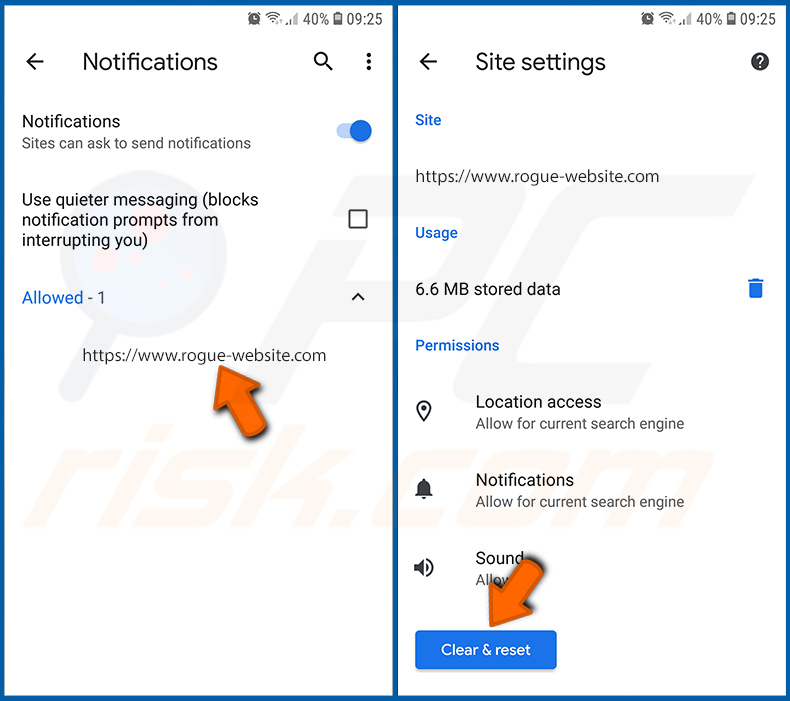
Trouvez les sites Web qui diffusent des notifications de navigateur, appuyez dessus et cliquez sur « Effacer et réinitialiser ». Cela supprimera les autorisations accordées à ces sites Web pour diffuser des notifications. Cependant, une fois que vous visiterez à nouveau le même site, il pourra vous redemander une autorisation. Vous pouvez choisir d'accorder ou non ces autorisations (si vous choisissez de refuser, le site Web ira dans la section « Bloqué » et ne vous demandera plus l'autorisation).
[Retour à la Table des Matières]
Réinitialiser le navigateur Chrome :
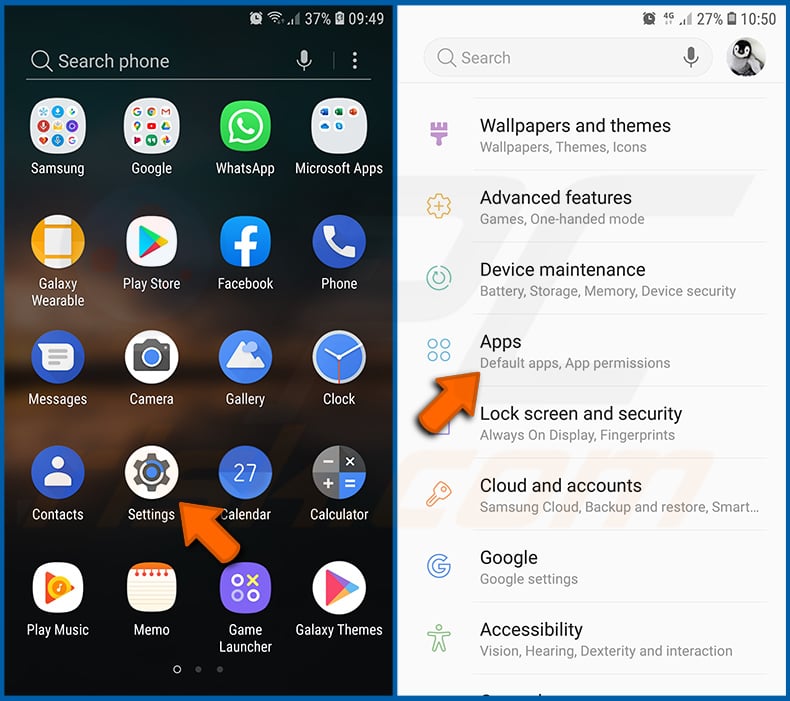
Allez dans « Paramètres », faites défiler jusqu'à ce que vous voyiez « Applications » et appuyez dessus.
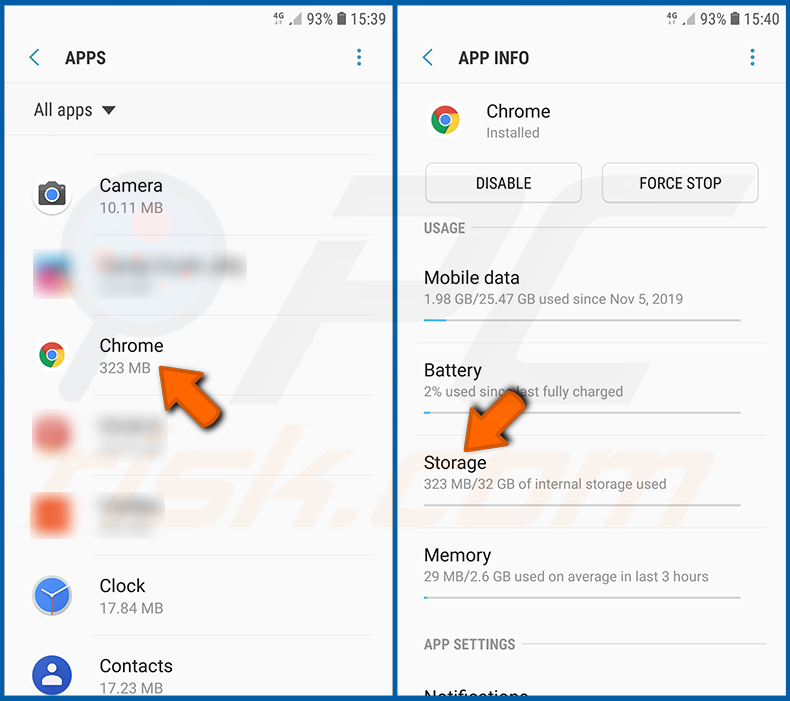
Faites défiler jusqu'à ce que vous trouviez l'application « Chrome », sélectionnez-la et appuyez sur l'option « Stockage ».
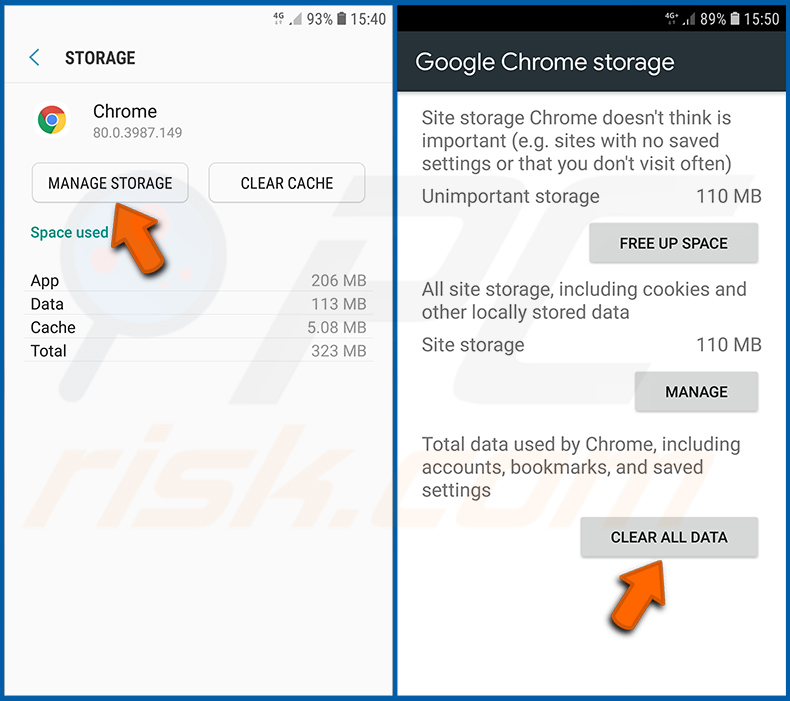
Appuyez sur « GÉRER LE STOCKAGE », puis sur « EFFACER TOUTES LES DONNÉES » et confirmez l'action en appuyant sur « OK ». Notez que la réinitialisation du navigateur éliminera toutes les données qui y sont stockées. Cela signifie que tous les identifiants/mots de passe enregistrés, l'historique de navigation, les paramètres non par défaut et autres données seront supprimés. Vous devrez également vous reconnecter à tous les sites Web.
[Retour à la Table des Matières]
Supprimer l'historique de navigation du navigateur Firefox :
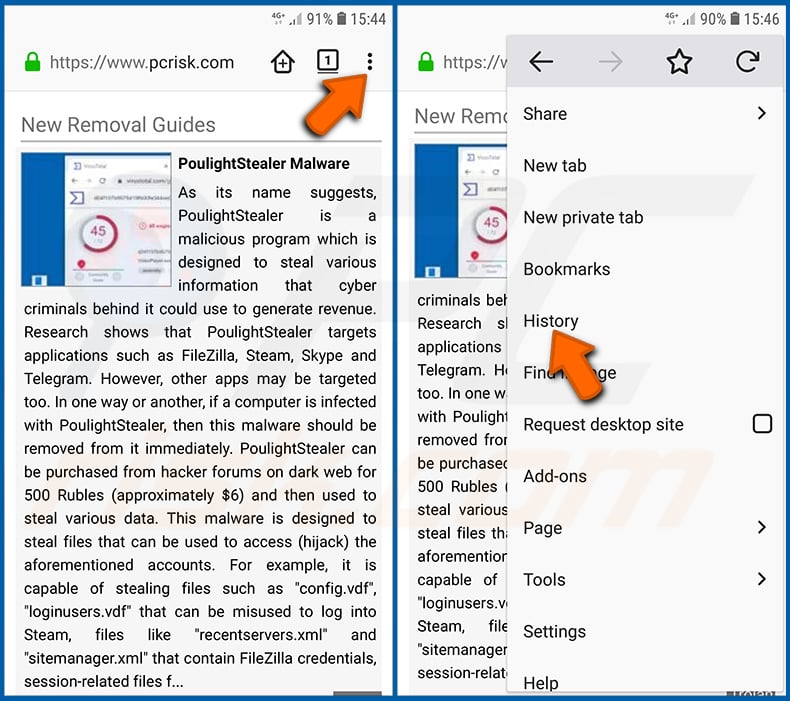
Appuyez sur le bouton « Menu » (trois points dans le coin supérieur droit de l'écran) et sélectionnez « Historique » dans le menu déroulant ouvert.
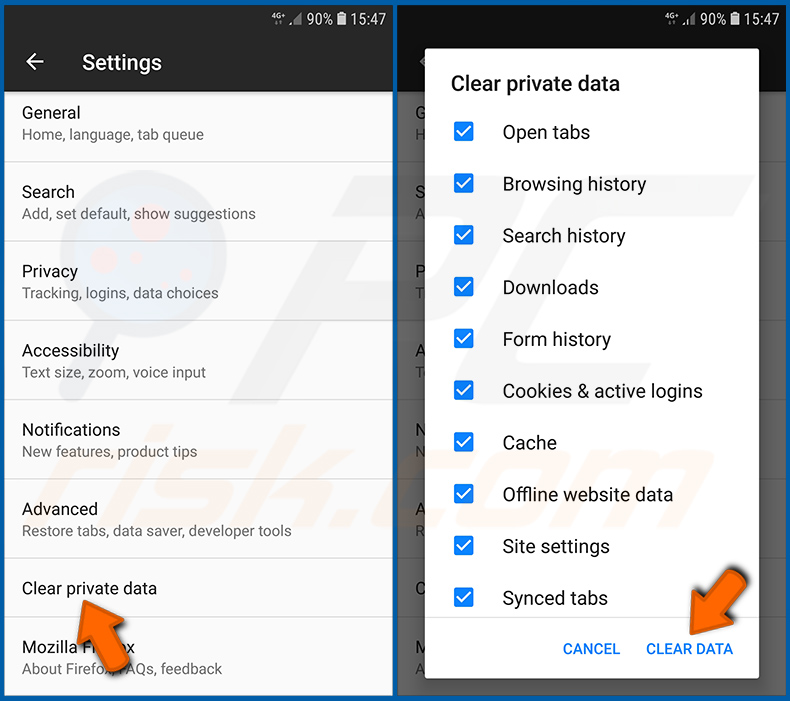
Faites défiler jusqu'à ce que vous voyiez « Effacer les données privées » et appuyez dessus. Sélectionnez les types de données que vous souhaitez supprimer et appuyez sur « EFFACER LES DONNÉES ».
[Retour à la Table des Matières]
Désactiver les notifications du navigateur dans le navigateur Firefox :
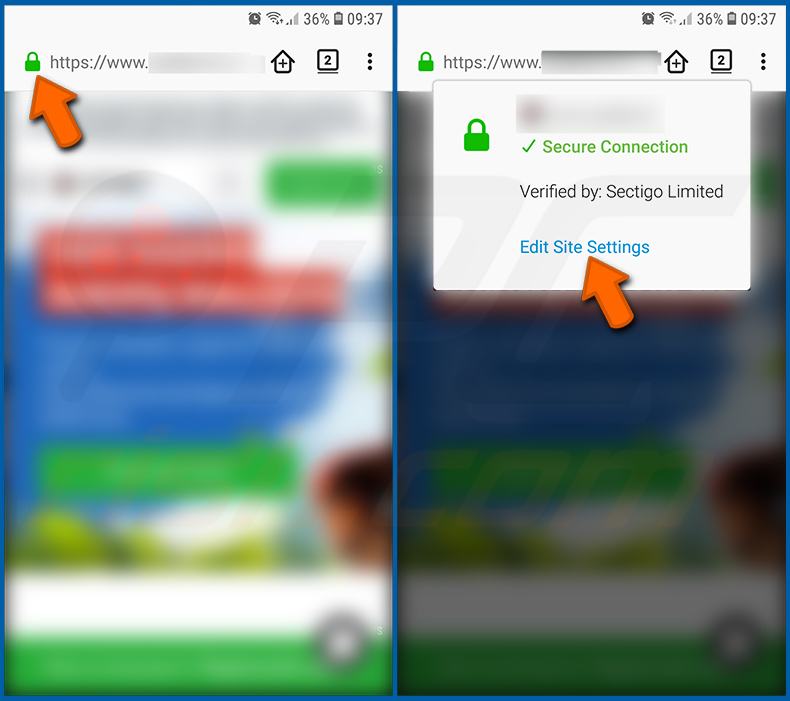
Visitez le site Web qui diffuse des notifications de navigateur, appuyez sur l'icône affichée à gauche de la barre d'URL (l'icône ne sera pas nécessairement un « Cadenas ») et sélectionnez « Modifier les paramètres du site ».
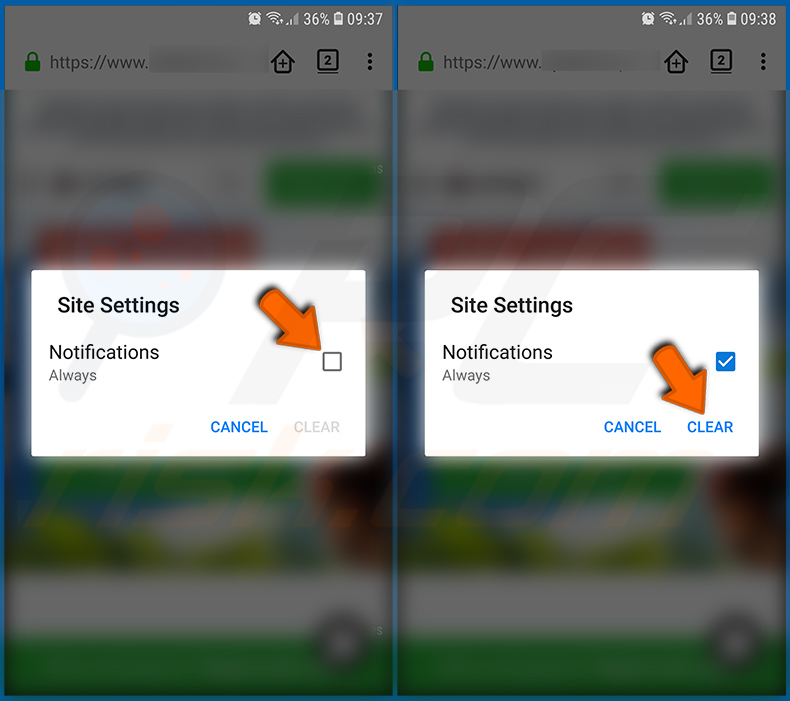
Dans la fenêtre contextuelle ouverte, sélectionnez l'option « Notifications » et appuyez sur « EFFACER ».
[Retour à la Table des Matières]
Réinitialiser le navigateur Firefox :
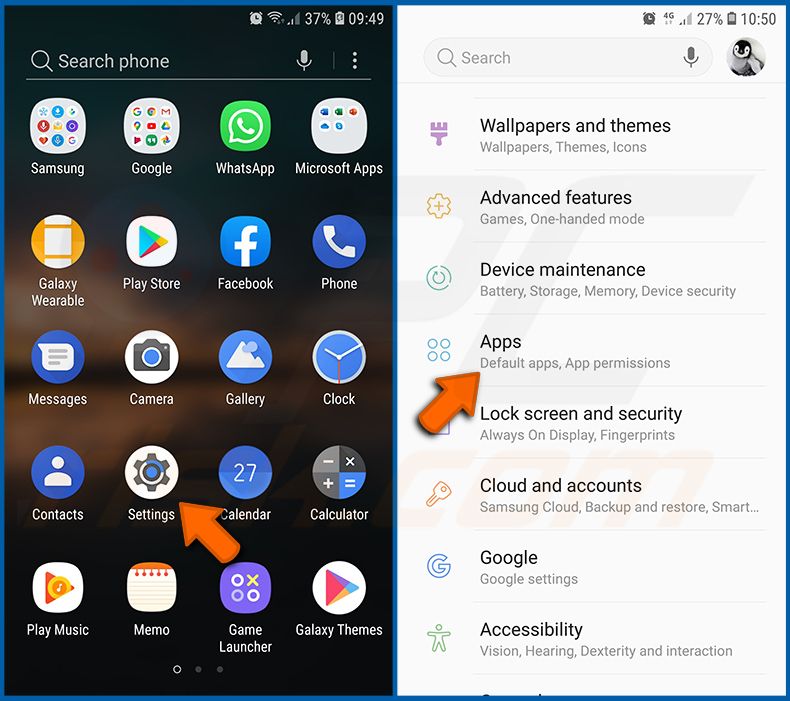
Allez dans « Paramètres », faites défiler jusqu'à ce que vous voyiez « Applications » et appuyez dessus.
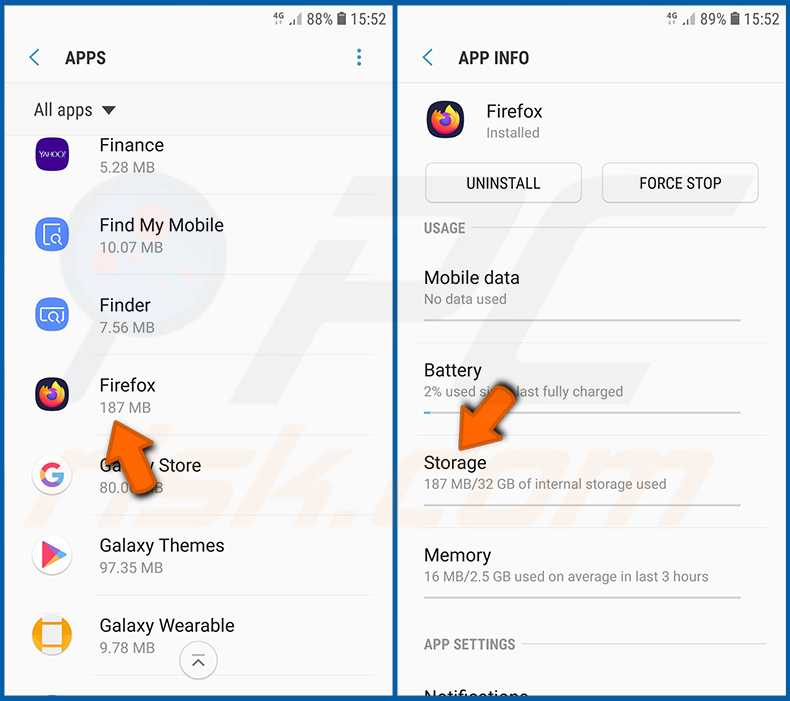
Faites défiler jusqu'à ce que vous trouviez l'application « Firefox », sélectionnez-la et appuyez sur l'option « Stockage ».
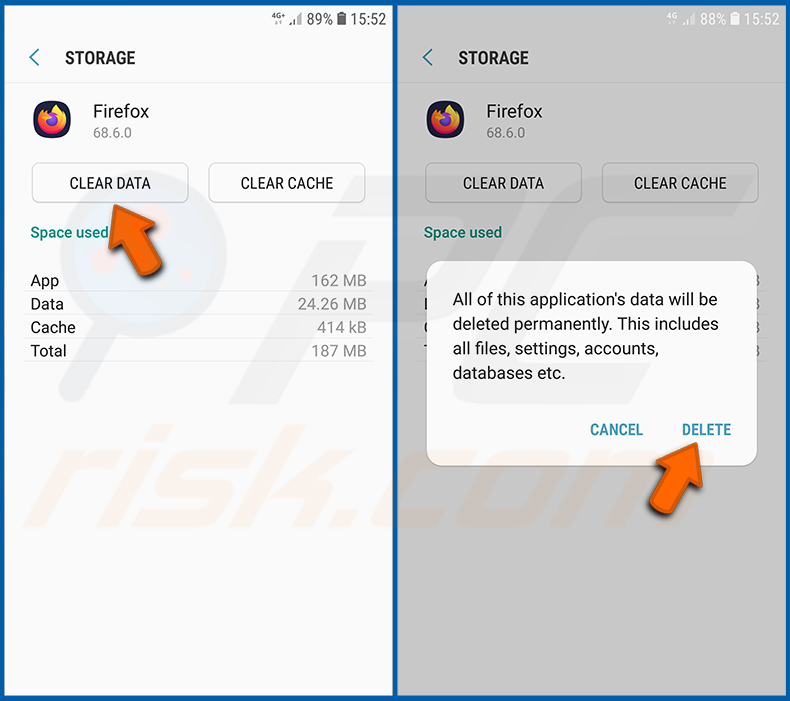
Appuyez sur « EFFACER LES DONNÉES » et confirmez l'action en appuyant sur « SUPPRIMER ». Notez que la réinitialisation du navigateur éliminera toutes les données qui y sont stockées. Cela signifie que tous les identifiants/mots de passe enregistrés, l'historique de navigation, les paramètres non par défaut et autres données seront supprimés. Vous devrez également vous reconnecter à tous les sites Web.
[Retour à la Table des Matières]
Désinstaller les applications potentiellement indésirables et/ou malveillantes :
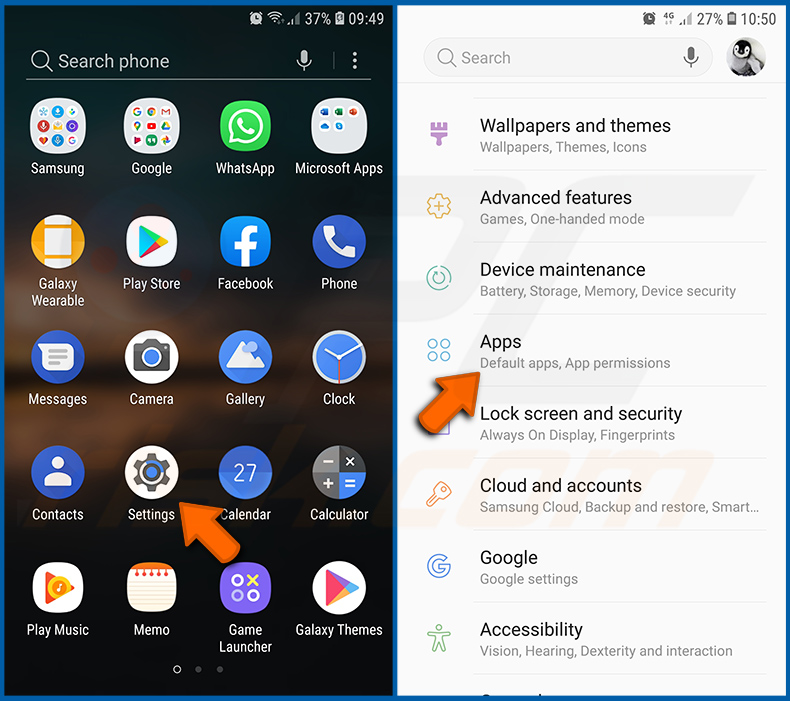
Allez dans « Paramètres », faites défiler jusqu'à ce que vous voyiez « Applications » et appuyez dessus.
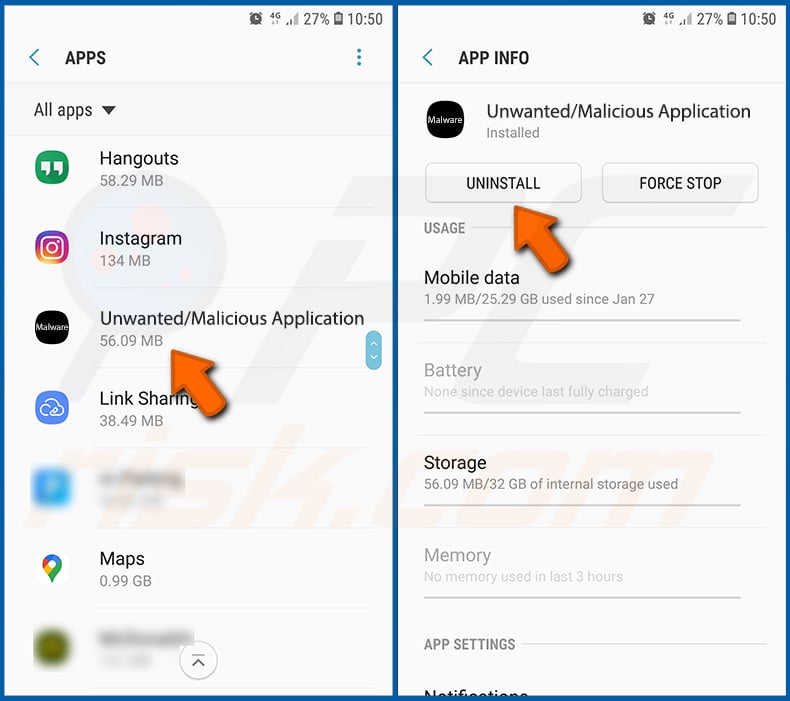
Faites défiler jusqu'à ce que vous voyiez une application potentiellement indésirable et/ou malveillante, sélectionnez-la et appuyez sur « Désinstaller ». Si, pour une raison quelconque, vous ne parvenez pas à supprimer l'application sélectionnée (par exemple, un message d'erreur s'affiche), vous devriez essayer d'utiliser le « Mode sans échec ».
[Retour à la Table des Matières]
Démarrer l'appareil Android en « Mode sans échec » :
Le « Mode sans échec » du système d'exploitation Android désactive temporairement l'exécution de toutes les applications tierces. L'utilisation de ce mode est un bon moyen de diagnostiquer et de résoudre divers problèmes (par exemple, supprimer des applications malveillantes qui vous empêchent de le faire lorsque l'appareil fonctionne « normalement »).
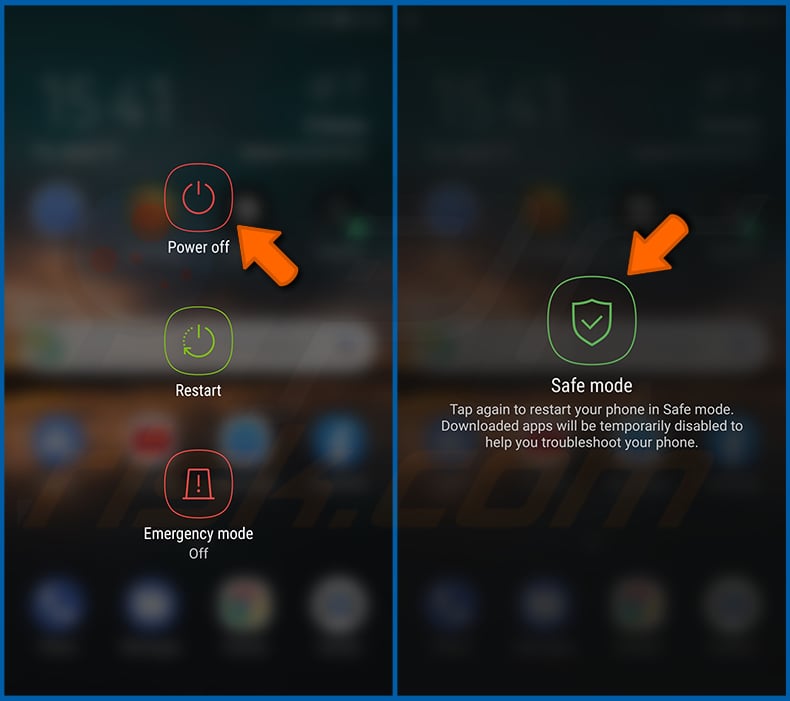
Appuyez sur le bouton « Marche/Arrêt » et maintenez-le enfoncé jusqu'à ce que vous voyiez l'écran « Éteindre ». Appuyez sur l'icône « Éteindre » et maintenez-la enfoncée. Après quelques secondes, l'option « Mode sans échec » apparaîtra et vous pourrez l'exécuter en redémarrant l'appareil.
[Retour à la Table des Matières]
Vérifier l'utilisation de la batterie de diverses applications :
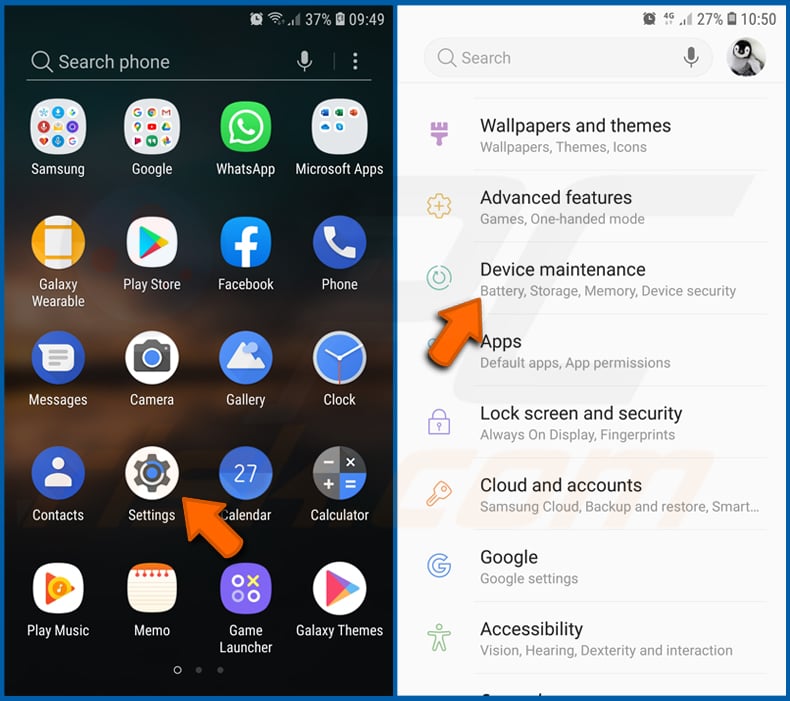
Allez dans « Paramètres », faites défiler jusqu'à ce que vous voyiez « Maintenance de l'appareil » et appuyez dessus.
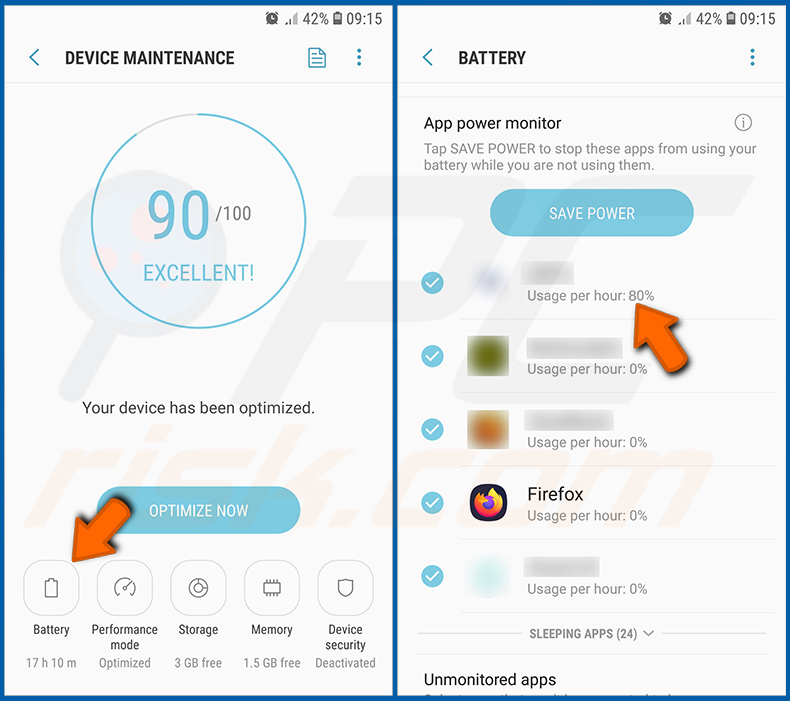
Appuyez sur « Batterie » et vérifiez l'utilisation de chaque application. Les applications légitimes/authentiques sont conçues pour utiliser le moins d'énergie possible afin d'offrir la meilleure expérience utilisateur et d'économiser de l'énergie. Par conséquent, une utilisation élevée de la batterie peut indiquer que l'application est malveillante.
[Retour à la Table des Matières]
Vérifier l'utilisation des données de diverses applications :
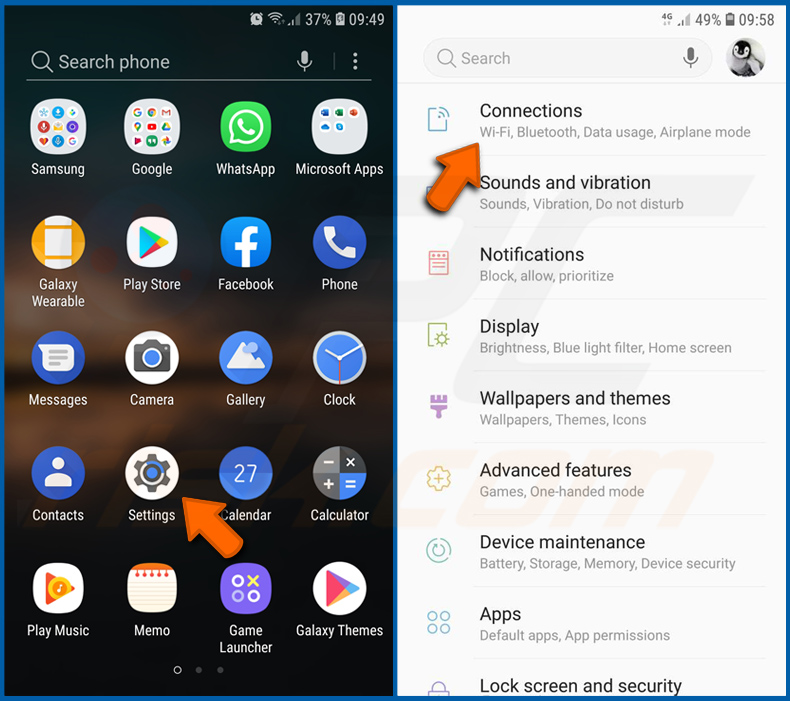
Allez dans « Paramètres », faites défiler jusqu'à ce que vous voyiez « Connexions » et appuyez dessus.
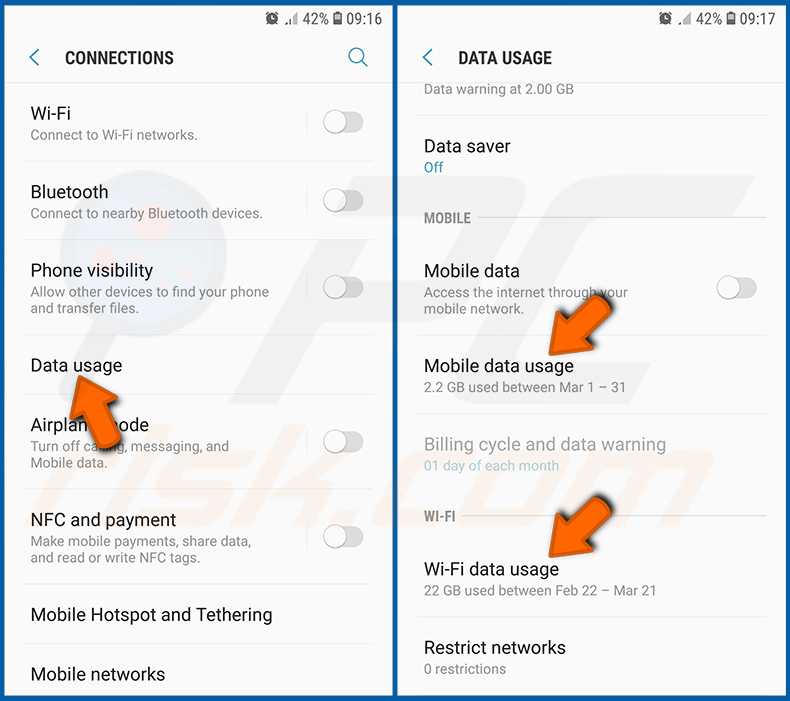
Faites défiler jusqu'à ce que vous voyiez « Utilisation des données » et sélectionnez cette option. Comme pour la batterie, les applications légitimes/authentiques sont conçues pour minimiser autant que possible l'utilisation des données. Cela signifie qu'une utilisation massive des données peut indiquer la présence d'une application malveillante. Notez que certaines applications malveillantes peuvent être conçues pour fonctionner uniquement lorsque l'appareil est connecté à un réseau sans fil. Pour cette raison, vous devriez vérifier l'utilisation des données à la fois en mode Mobile et en Wi-Fi.
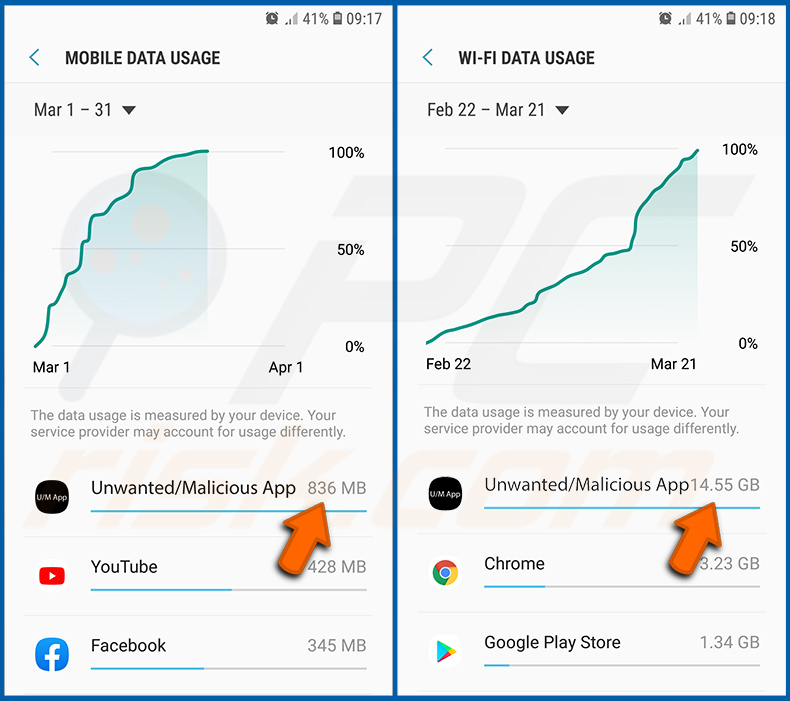
Si vous trouvez une application qui utilise beaucoup de données alors que vous ne l'utilisez jamais, nous vous conseillons vivement de la désinstaller dès que possible.
[Retour à la Table des Matières]
Installer les dernières mises à jour logicielles :
Maintenir le logiciel à jour est une bonne pratique en matière de sécurité de l'appareil. Les fabricants d'appareils publient continuellement divers correctifs de sécurité et mises à jour Android afin de corriger les erreurs et les bugs qui peuvent être exploités par les cybercriminels. Un système obsolète est beaucoup plus vulnérable, c'est pourquoi vous devriez toujours vous assurer que le logiciel de votre appareil est à jour.
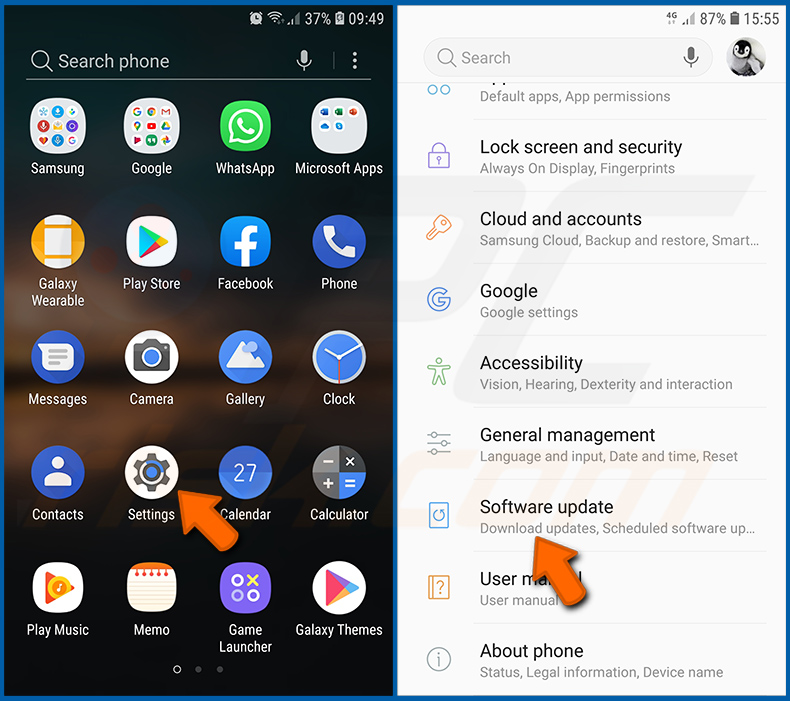
Allez dans « Paramètres », faites défiler jusqu'à ce que vous voyiez « Mise à jour logicielle » et appuyez dessus.
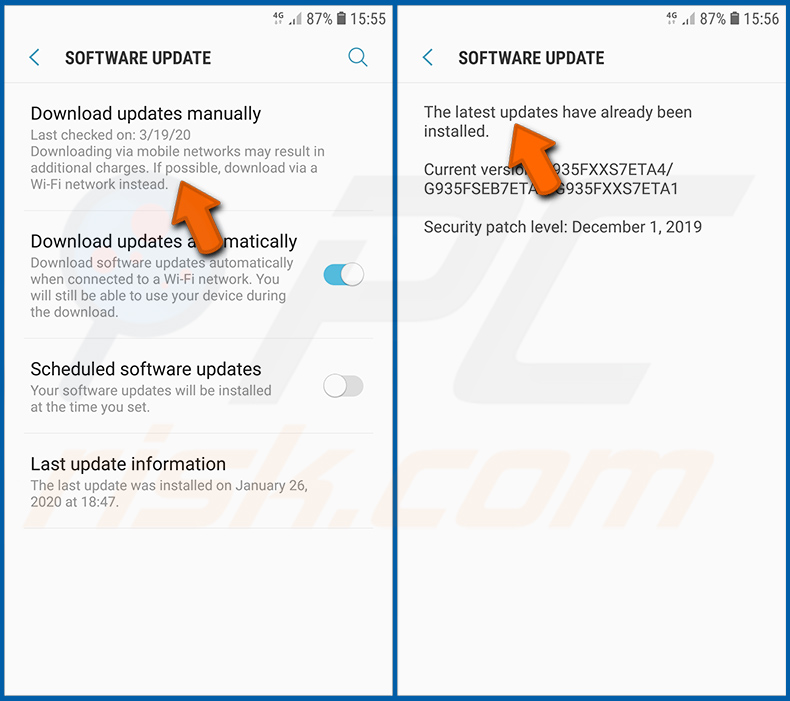
Appuyez sur « Télécharger les mises à jour manuellement » et vérifiez si des mises à jour sont disponibles. Si c'est le cas, installez-les immédiatement. Nous recommandons également d'activer l'option « Télécharger les mises à jour automatiquement » - elle permettra au système de vous avertir dès qu'une mise à jour est publiée et/ou de l'installer automatiquement.
[Retour à la Table des Matières]
Réinitialiser le système à son état par défaut :
Effectuer une « Réinitialisation d'usine » est un bon moyen de supprimer toutes les applications indésirables, de rétablir les paramètres du système par défaut et de nettoyer l'appareil en général. Cependant, vous devez garder à l'esprit que toutes les données de l'appareil seront supprimées, y compris les photos, les fichiers vidéo/audio, les numéros de téléphone (stockés dans l'appareil, pas sur la carte SIM), les messages SMS, et ainsi de suite. En d'autres termes, l'appareil sera restauré à son état d'origine.
Vous pouvez également restaurer les paramètres système de base et/ou simplement les paramètres réseau.
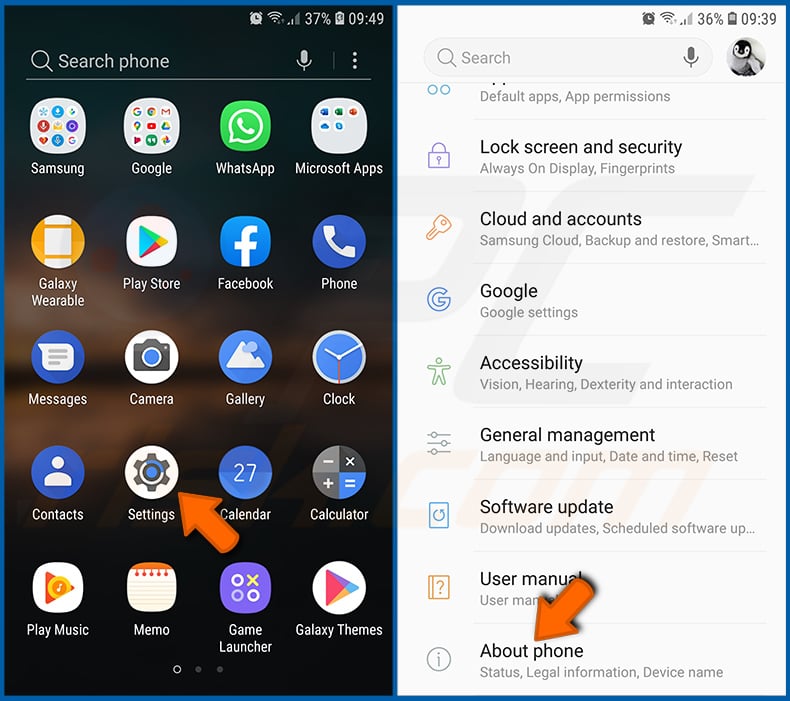
Allez dans « Paramètres », faites défiler jusqu'à ce que vous voyiez « À propos du téléphone » et appuyez dessus.
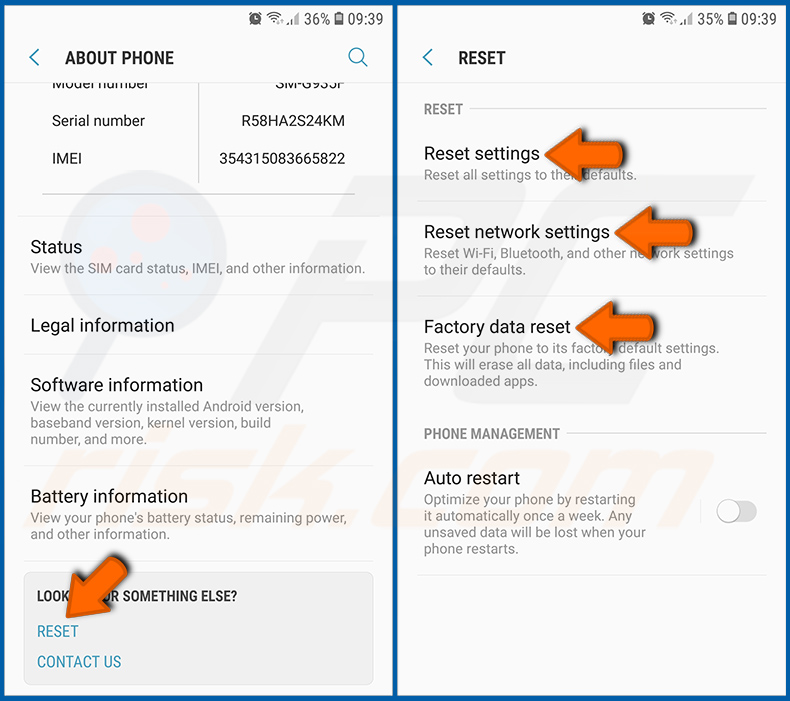
Faites défiler jusqu'à ce que vous voyiez « Réinitialiser » et appuyez dessus. Choisissez maintenant l'action que vous souhaitez effectuer :
« Réinitialiser les paramètres » - rétablir tous les paramètres système par défaut ;
« Réinitialiser les paramètres réseau » - rétablir tous les paramètres liés au réseau par défaut ;
« Réinitialisation des données d'usine » - réinitialiser l'ensemble du système et supprimer complètement toutes les données stockées ;
[Retour à la Table des Matières]
Désactiver les applications disposant de privilèges d'administrateur :
Si une application malveillante obtient des privilèges de niveau administrateur, elle peut sérieusement endommager le système. Pour garder l'appareil aussi sûr que possible, vous devriez toujours vérifier quelles applications disposent de tels privilèges et désactiver celles qui ne devraient pas en avoir.
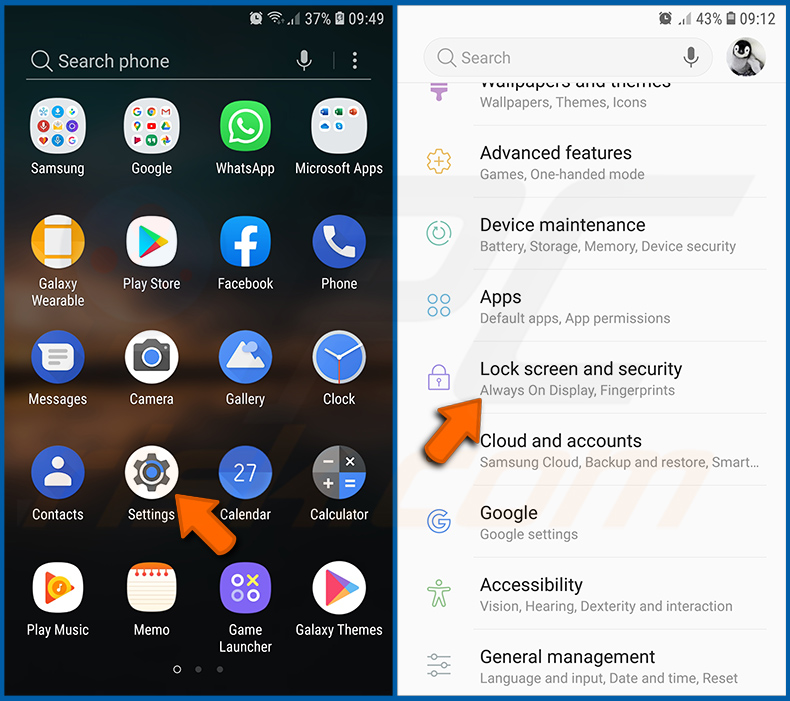
Allez dans « Paramètres », faites défiler jusqu'à ce que vous voyiez « Écran de verrouillage et sécurité » et appuyez dessus.
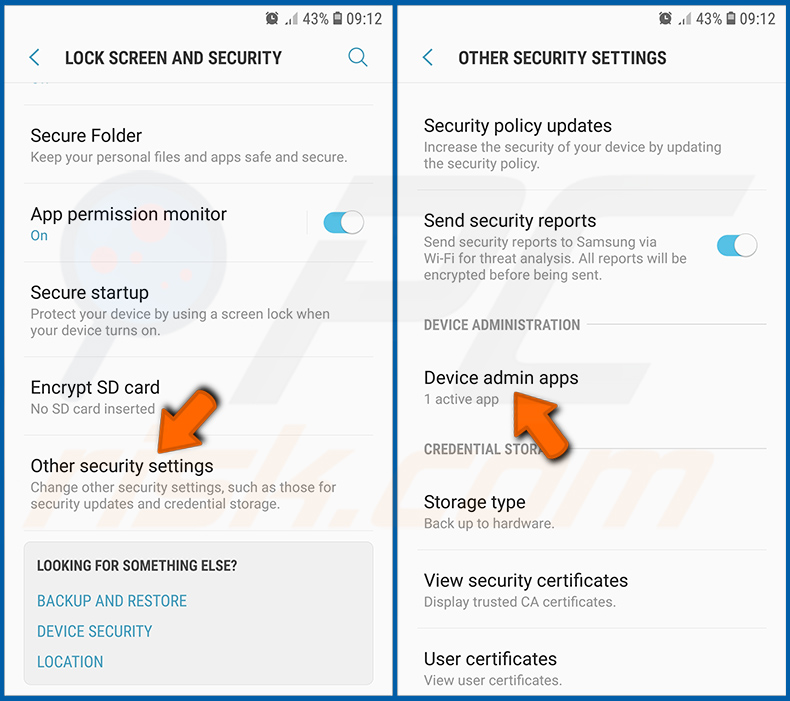
Faites défiler jusqu'à ce que vous voyiez « Autres paramètres de sécurité », appuyez dessus, puis appuyez sur « Applications d'administration de l'appareil ».
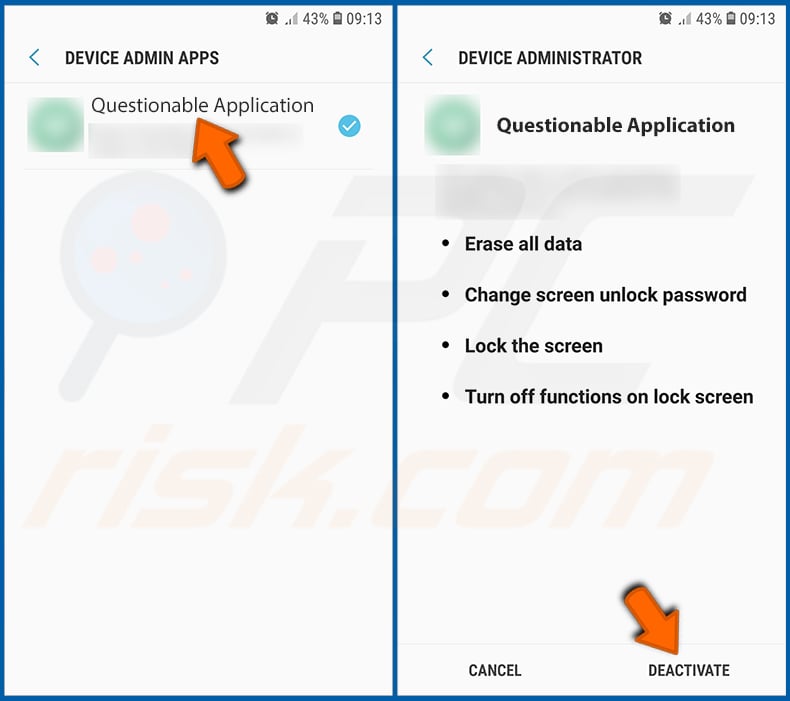
Identifiez les applications qui ne devraient pas disposer de privilèges d'administrateur, appuyez dessus, puis appuyez sur « DÉSACTIVER ».
Foire aux questions (FAQ)
Mon appareil Android est infecté par le malware Mantax Otax, dois-je formater mon périphérique de stockage pour m'en débarrasser ?
Le formatage n'est généralement pas nécessaire pour supprimer Mantax Otax. L'exécution d'un antivirus mobile réputé tel que Combo Cleaner devrait suffire à le détecter et à l'éliminer. Gardez à l'esprit que la suppression du malware (ou le formatage de l'appareil) ne déchiffrera pas les fichiers qui ont déjà été verrouillés, alors restaurez-les à partir d'une sauvegarde si vous en avez une.
Quels sont les problèmes les plus importants que le malware Mantax Otax peut causer ?
Mantax Otax peut chiffrer les photos et documents, verrouiller le téléphone derrière de faux écrans de verrouillage et voler le véritable code PIN de verrouillage d'écran. Il enregistre également l'écran, prend des photos secrètes et collecte les messages SMS (y compris les mots de passe à usage unique), les contacts, les journaux d'appels, l'historique de navigation, ainsi que les conversations WhatsApp et Telegram.
En conséquence, les victimes sont confrontées à la perte de données, à de graves problèmes de confidentialité, à des pertes financières et au vol d'identité.
Quel est le but du malware Mantax Otax ?
La plupart des attaques de malwares sont motivées par le profit, et Mantax Otax ne fait pas exception - il pousse les victimes à payer pour récupérer leurs fichiers tout en récoltant des données qui peuvent être exploitées ou vendues. Cela dit, les malwares peuvent également être utilisés pour l'amusement, des rancunes personnelles, la perturbation, l'hacktivisme ou des raisons politiques, et les fonctionnalités de harcèlement de la deuxième version suggèrent que certains opérateurs prennent simplement plaisir à tourmenter les victimes.
Comment le malware Mantax Otax s'est-il infiltré dans mon appareil Android ?
Mantax Otax a été diffusé sous forme de fichiers APK sur des services de partage de fichiers tiers, avec des liens propagés via des applications de messagerie, des messages de phishing et d'autres techniques d'ingénierie sociale. Les échantillons observés jusqu'à présent se faisaient passer pour une application indonésienne de contenu pour adultes ou pour des applications légitimes comme Grok. Il n'est pas distribué via le Google Play Store, les victimes doivent donc l'installer manuellement.
Combo Cleaner me protégera-t-il des malwares ?
Combo Cleaner est capable de détecter et d'éliminer la quasi-totalité des infections de malwares connues, y compris des menaces telles que Mantax Otax. Effectuer une analyse complète du système est essentiel, car les programmes malveillants sophistiqués se cachent généralement en profondeur dans le système.
Partager:
 Facebook
 X.com
X.com
 LinkedIn
 Copier le lien

Tomas Meskauskas
Chercheur expert en sécurité, analyste professionnel en logiciels malveillants
Je suis passionné par la sécurité informatique et la technologie. J'ai une expérience de plus de 10 ans dans diverses entreprises liées à la résolution de problèmes techniques informatiques et à la sécurité Internet. Je travaille comme auteur et éditeur pour PCrisk depuis 2010. Suivez-moi sur Twitter et LinkedIn pour rester informé des dernières menaces de sécurité en ligne.
Le portail de sécurité PCrisk est proposé par la société RCS LT.
Des chercheurs en sécurité ont uni leurs forces pour sensibiliser les utilisateurs d'ordinateurs aux dernières menaces en matière de sécurité en ligne. Plus d'informations sur la société RCS LT.
Nos guides de suppression des logiciels malveillants sont gratuits. Cependant, si vous souhaitez nous soutenir, vous pouvez nous envoyer un don.
Faire un donLe portail de sécurité PCrisk est proposé par la société RCS LT.
Des chercheurs en sécurité ont uni leurs forces pour sensibiliser les utilisateurs d'ordinateurs aux dernières menaces en matière de sécurité en ligne. Plus d'informations sur la société RCS LT.
Nos guides de suppression des logiciels malveillants sont gratuits. Cependant, si vous souhaitez nous soutenir, vous pouvez nous envoyer un don.
Faire un don
▼ Montrer la discussion